アート作品の管理が、
かんたんにできる。
Managing your art,
made simple.
集めた作品も、つくった作品も、預かった作品も。画像・価格・購入先・請求書から展示歴まで、ばらばらだった記録がひとつに集まります。パソコンでもiPhoneでも、いつでもどこでも。 Works you collected, works you made, works you hold on consignment. Images, prices, sources, invoices, exhibition history — everything once scattered, now in one place. On your desk or in your pocket.
クレジットカードの登録は不要です。アカウントをお持ちの方はログイン。 No credit card required. Already have an account? Sign in.
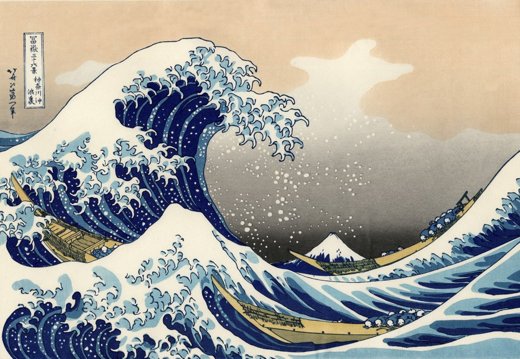
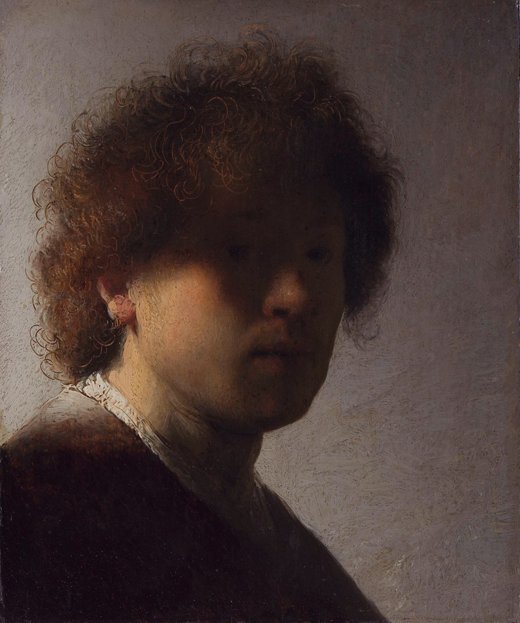
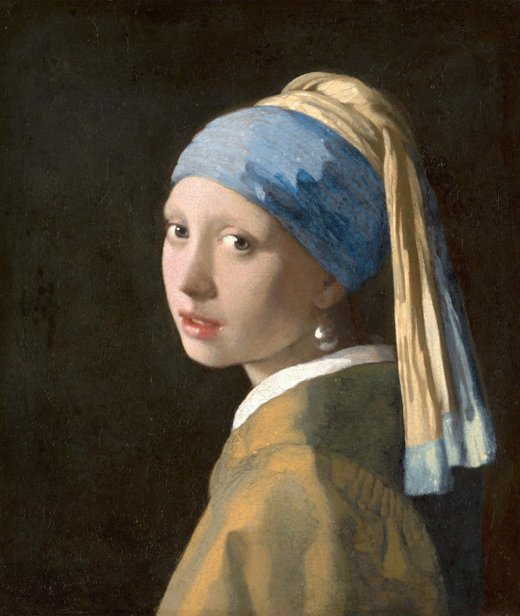
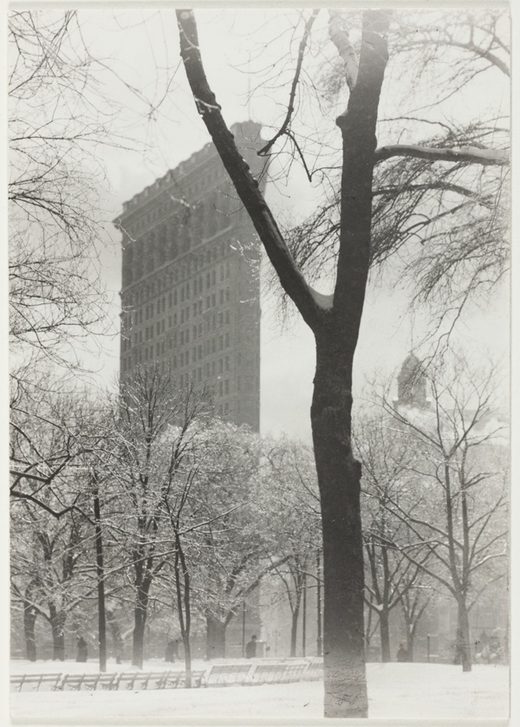
| 画像Image | 作家Artist | 作品名Title | 制作年Year | 技法Medium | 価格Price | 状態Status |
|---|---|---|---|---|---|---|
|
Katsushika Hokusai | 神奈川沖浪裏The Great Wave off Kanagawa | c. 1831 | 木版画Woodblock | ¥1,200,000 | 所蔵Owned |
|
Rembrandt van Rijn | 自画像Self-Portrait | c. 1628 | 油彩Oil on panel | ¥3,800,000 | 所蔵Owned |
|
Johannes Vermeer | 真珠の耳飾りの少女Girl with a Pearl Earring | c. 1665 | 油彩Oil on canvas | ¥5,400,000 | 委託中On consignment |
|
Alfred Stieglitz | フラットアイアンThe Flatiron | 1903 | 写真Photograph | ¥2,080,000 | 所蔵Owned |
記録は、シンプルなほど続く。 The simpler the record, the longer it lasts.
難しい設定も、覚えることもありません。作品を足していくだけで、コレクションが形になります。 No setup, nothing to learn. Add a work, and the collection takes shape on its own.
作品情報をテキスト、画像、ファイルで保存Text, images and files in one record
画像・作家・タイトル・制作年・技法・サイズ・価格・購入先。ドラッグ&ドロップで作品画像や展示風景、請求書など(JPG・PDF)も格納出来ます。Image, artist, title, year, medium, size, price, source. Drag and drop artwork photos, installation shots or invoices (JPG, PDF) straight into the record.
作品リストをPDFで出力Export work lists as PDF
選んだ作品をそのまま一覧表として出力。価格を隠す、項目を選ぶ、レイアウトを変えて使えます。Export any selection as a clean list. Hide prices, choose which fields to show, change the layout.
作家・購入先などでソートSort by artist, source and more
作家名を押せば、その作家の作品だけ。ギャラリー名を押せば、そこから買った作品だけ。コレクションの傾向を確認できます。Tap an artist to see only their works. Tap a gallery to see everything you bought there. See the shape of your collection.
どこからでも、iPhoneでもAnywhere, including your phone
クラウドに保存されるので、PCでもスマホからでも確認・記録できます。スマホで撮った写真をそのままデータ格納可能です。Everything syncs to the cloud — check and record from your computer or your phone. Snap a photo on your phone and store it straight into the record.
セキュリティSecurity
作品も資料もあなたのアカウントの中だけ。画像は署名付きURLで守られ、他の人からは見ることが出来ません。Works and documents live inside your account only. Images are served through signed URLs — nobody else can see them.
データのインポート・エクスポートImport and export your data
CSVで一括読み込み、いつでも書き出し。すでにExcelで管理していても、そのまま引っ越せます。もちろん情報のインポート機能もございます。Bulk import from CSV, export whenever you like. If your collection already lives in a spreadsheet, bring it over as it is.
作品管理の最強ツール The ultimate tool for managing your works
ギャラリーが管理する作品の状態が全て可視化されるデータベースです。 A database that makes the status of every work in your gallery fully visible.
作品1点ごとの詳細データ管理Detailed data for every single work
作品のデータはもちろん、現在の状況、売約から配送などのステイタス管理から請求支払管理まで一気通貫に可視化されます。Not just the work's data, but its current status — from sold to shipped — and invoicing and payments too, all made visible end to end.
作品の受取から売約、配送までをもれなく管理From receipt to sold to delivered, nothing missed
売約 → 入金 → 箱の用意 → 発送 → お渡し。どの作品が現在どういうステイタスか、一目でわかります。「あの作品、どうしたっけ?」がなくなります。Sold, paid, boxed, shipped, delivered. See at a glance where each work stands — and never wonder "what happened to that one?" again.
適格請求書と、支払明細書Invoices and artist statements
選んだ作品から、インボイス制度に対応した請求書をそのまま発行。作家への支払明細書も、委託手数料と源泉徴収を引いた金額で作れます。発行済みの書類は、あとから金額が変わりません。Issue a Japanese qualified invoice straight from the works you select. Artist statements too — commission and withholding already deducted. Once issued, the numbers are frozen.
コレクターへの提案が、どうなったかWhat happened to your offer to a collector
お客さまに送った作品リストが、開かれたかどうか、何回見られたか。興味あり・見送り・成約まで残せます。「返事がない」を、記録として持てます。Did they open the list you sent? How many times? Mark it interested, declined or sold. Even silence becomes a record.
作家ごとの管理番号Artist-based reference numbers
Hanako Yamada さんの作品なら HAYA-00001、HAYA-00002。英語表記から頭文字を取り、無ければ自動のコードを振ります。番号は機械が管理するので、重複も付け忘れも起きません。作家台帳には手数料・振込先・登録番号も持てます。A work by Hanako Yamada becomes HAYA-00001, HAYA-00002 — initials from the English name, or an automatic code if there is none. Numbers are handled by the system, so they never clash or get forgotten. The artist ledger also holds commission, bank details and tax registration.
誰がいつ何を変えたかWho changed what, and when
誰が価格を書き換えた、状態を売約にした…など、スタッフの操作はすべて記録に残ります。1つ前の値に戻すこともできますし、毎日の控えから丸ごと巻き戻すこともできます。複数人で使っても、取り返しがつきます。Who edited a price, who set a status to sold — every staff action is logged. Undo a single change, or roll the whole collection back from a daily snapshot. With several people using it, mistakes stay recoverable.
いまの台帳から、そのまま移せますBring your current records with you
Airtable や Excel の作品リストを、CSVで取り込めます。作家・購入者・展覧会は名前から自動で作られ、作品と結びつきます。数千点でも、進み具合を見ながら一度に。乗り換えの初日から、いつもの台帳が入った状態で始められます。Import your works from Airtable or Excel as CSV. Artists, buyers and exhibitions are created from the names and linked automatically. Thousands of works at once, with progress shown. Start day one with your own records already in place.
画像は、原寸のままImages kept at full size
画廊の仕事は画像が命です。Gallery プランでは、いただいた画像をそのままの解像度で保管します(1枚10MBまで、30GB)。作品リスト、請求書、受入票にもそのまま載せられます。フォルダごとまとめて取り込むこともできます。For a gallery, the image is everything. On the Gallery plan we keep your files at their original resolution (up to 10 MB each, 30 GB in total). Use them on work lists, invoices and receipts — and import a whole folder at once.
展覧会ごとに、まとめて動かすRun an exhibition as one unit
展覧会に出品した作品を一覧で見て、状態・保管場所・委託の取り分をまとめて変えられます。出品数・売約数・売上も展覧会ごとに。会期が終わったら、63点まとめて在庫に戻す——そんな操作が数回で済みます。See everything in a show, then change status, location or commission for all of them at once. Counts and sales are tracked per exhibition. When a show closes, put all 63 works back in stock in a few clicks.
いま作っているところです。実際の画面から、二つだけお見せします。作品名・金額はサンプルです。 Being built right now. Here are two of the actual screens. Titles and figures are samples.
売約から、お渡しまで。どの作品がいまどの段階にあるか、止まっている案件はどれか。「あの作品、どうしたっけ?」がなくなります。 From sold to delivered. See where every work stands, and which ones have stalled. Never wonder “what happened to that one?” again.
| 管理番号Ref | 作品名Title | 販売先Buyer | 販売価格Price | 手数料Rate |
|---|---|---|---|---|
| HAYA-00042 | 余白 IMargin I | 伊藤様 | ¥380,000 | 50% |
| HAYA-00045 | 朝の記録Morning Note | 渡辺様 | ¥120,000 | 50% |
| HAYA-00051 | 春の記憶Spring | 松本様 | ¥420,000 | 50% |
作家ごとの手数料から、自動で計算。作家を登録するときに手数料を決めておけば、あとは売れた作品を選ぶだけです。適格請求書の登録番号と振込先も、そのまま明細に載ります。 Calculated from each artist’s own rate. Set the commission once when you register the artist, then just pick the works that sold. Registration number and bank details are carried onto the statement.
つくった作品が、いま、どこにあるか。それを知っているのは、あなただけです。 Where is each work you made, right now? Only you can know — if you wrote it down.
預けた作品、売れた作品、手元に残した作品。制作と同じ数だけ記録は増えていきます。Artist プランは、作家のための台帳です。 Works on consignment, works sold, works still in the studio. The records grow with the making. The Artist plan is a ledger built for artists.
作品情報を、テキスト・画像・ファイルで保存Save each work as text, images and files
画像・作家・タイトル・制作年・技法・サイズ・価格・購入先。ドラッグ&ドロップで、作品画像や展示風景、各種資料(JPG・PDF)もそのまま格納できます。Image, artist, title, year, medium, size, price, source. Drag and drop artwork photos, installation shots and documents (JPG, PDF) straight into the record.
作品リストを、PDFで出力Export a work list as PDF
選んだ作品を、そのまま一覧表として出力。ポートフォリオとしても使えます。Turn the works you select into a clean list — ready to use as a portfolio.
いまどこにあるか、誰に売れたかWhere it is, and who bought it
作品が今どこにあるのか、売れた先の顧客情報まで、ひとつのデータベースとして整理できます。Track where each work is now, and keep buyer details together in one organized database.
どこからでも、iPhoneでもFrom anywhere, even on iPhone
クラウドに保存されるので、PCからでもスマホからでも確認・記録できます。スマホで撮った写真も、そのまま格納できます。Everything lives in the cloud — check and record from your computer or your phone. Photos you take on your phone go straight in.
セキュリティSecurity
作品も資料も、あなたのアカウントの中だけ。画像は署名付きURLで守られ、ほかの人が見ることはできません。Your works and documents stay inside your account alone. Images are protected with signed URLs — no one else can see them.
日英バイリンガル表記Bilingual, Japanese and English
国外の美術関係者からの問い合わせにも対応。海外レジデンスやアワードへの応募のときにも役立ちます。Ready for enquiries from art professionals abroad — and useful when you apply to overseas residencies and awards.
最初の1点を入れるまで、3分。 Three minutes to your first work.
アカウントを作るCreate an account
メールアドレスとパスワードだけ。14日間は無料です。Email and password. Free for the first 14 days.
作品を足すAdd a work
画像をドラッグして、作家名とタイトルを入れる。それだけ。Drag in an image, type the artist and title. That's it.
育てていくLet it grow
買うたびに1点ずつ。気づけば、あなたのコレクションの記録になっています。One work at a time. Before long, it becomes the record of your collection.
ずっと使えるように、無理のない価格で。 Priced to be kept, not cancelled.
14日間無料。いつでも解約でき、データはCSVで持ち出せます。ギャラリープランは近日公開予定です。 Free for 14 days. Cancel anytime, and take your data with you as CSV. The Gallery plan is coming soon.
- 作品登録は無制限・保存容量3GB(作品画像 約3,000枚分)Unlimited works, 3GB storage (approx. 3,000 images)
- 1作品に何枚でも画像を追加As many images per work as you like
- 作品リストのPDF出力Work list PDF export
- 作家・購入先での絞り込みFilter by artist and source
- CSV入出力CSV import and export
- 作品登録は無制限・保存容量3GB(作品画像 約3,000枚分)Unlimited works, 3GB storage (approx. 3,000 images)
- エディション・A.P.・制作費Editions, A.P. and production costs
- 預け先・売れた先の管理Track consignments and sales
- 売約から入金・お渡しまでFrom sold to paid and delivered
- 展覧会の記録と、CVの書き出しExhibition log and CV export
- 画像入りPDF・共有リンク・CSVPDF with images, share links, CSV
近日公開します。
公開時は先着10ギャラリー限定の創業価格 ¥4,900/月(最初の1年間)をご用意します。先行のご案内を希望される方はお問い合わせください。
Launching in our next release.
At launch, the first 10 galleries get a founding price of ¥4,900/mo for the first year. Contact us to be notified.
- Personal のすべての機能Everything in Personal
- 委託の管理と、作家への分配計算Consignment tracking and artist payouts
- 売約から受渡までの進行管理Sold-to-delivered pipeline
- 適格請求書・支払明細書の発行Qualified invoices and artist statements
- 購入者・作家の台帳とオファー履歴Customer and artist ledgers, with offer history
- 展示・貸出の履歴と、操作の記録Exhibition history and full audit log
- 作家ごとの管理番号(HAYA-00001)Artist-based reference numbers
- スタッフの招待(2人目から1名につき+¥2,000/月)Invite your team (¥2,000/mo per additional member)
お申し込みの前にBefore you sign up
- 3つは、それぞれ別のサービスです。 同じ名前で並んでいますが、画面も、できることも、扱う情報も違います。 あとから別のプランに乗り換えることはできますが、そのときは 画面の作りが変わります。ご自分の立場に合うものをお選びください。 These are three separate services. They share a name, but the screens, the features and the information they hold are different. You can switch later, but the way the app works will change with it. Please choose the one that matches how you work.
- 1つのメールアドレスで使えるサービスは、1つだけです。 コレクターと作家、作家とギャラリーというように、 2つを同時に使いたい場合は、それぞれ別のメールアドレスでご登録ください。 One email address can be used for one service only. If you want to use two at once — say, Collector and Artist — please sign up with a separate email address for each.
よくあるご質問 Questions, answered
作品は何点まで登録できますか?How many works can I add?
点数の上限はありません。数点から数千点まで、同じように扱えます。There is no limit on the number of works. A handful or a few thousand — it behaves the same.
3つのプランは、何が違いますか?How do the three plans differ?
同じ名前で並んでいますが、それぞれ別のサービスです。画面も、できることも、扱う情報も違います。
Personal は、集めた作品を記録するための画面です。
Artist は、自分でつくった作品を管理する画面です。エディションや制作費、預け先を扱います。
Gallery は、画廊の仕事のための画面です。委託や作家への分配、請求書、スタッフでの共有を扱います。
あとから別のプランに乗り換えることはできますが、そのときは画面の作りが変わります。
They share a name, but they are three separate services. The screens, the features and the information they hold are different.
Personal is for recording a collection you have gathered.
Artist is for managing the work you make yourself — editions, production costs, where pieces are held.
Gallery is for running a gallery — consignments, artist payouts, invoices, and sharing with your team.
You can switch later, but the way the app works will change with it.
1つのメールアドレスで、2つのプランを使えますか?Can I use two plans with one email address?
使えません。1つのメールアドレスで使えるサービスは、1つだけです。
たとえば、ご自身のコレクションを Personal で記録しながら、画廊の仕事を Gallery で回したい——という場合は、それぞれ別のメールアドレスでご登録ください。
作品や購入者の情報も、サービスをまたいで共有されることはありません。
No. One email address can be used for one service only.
If you want to keep your own collection in Personal while running a gallery in Gallery, please sign up with a separate email address for each.
Works and customer records are never shared across services either.
画像はどれくらい保存できますか?How much can I store?
1作品に何枚でも画像を追加できます。枚数の上限はありません。保存できる総量と、画像の残り方は、サービスごとに違います。
Personal・Artist(保存容量 3GB)
画像は長辺2000px・品質90%に整えて保存します。1枚あたり1MBほどで、3,000枚ぶんが目安です。画面で見るにも、手元で見返すにも十分な大きさです。
Gallery(保存容量 30GB)
いただいた画像を、そのまま原寸で保存します。縮めません。JPEG以外(PNG・TIFFなど)も、その形式のまま残します。プレスへの提供、印刷物、アーカイブに使えます。1枚あたり10MBまでで、3,000枚ぶんが目安です。
受け取れる画像は、どのサービスも1枚10MBまでです。一眼レフで撮った写真も、そのまま入れられます。
どちらも、一覧に並べるための小さな画像は別に作ります。原寸を何十枚も並べても、表示が重くならないようにするためです。
You can add as many images per work as you like — there is no cap on the count. How much you can store, and how the images are kept, differs by service.
Personal and Artist (3GB)
Images are saved at up to 2000px on the long edge, at 90% quality — around 1MB each, so roughly 3,000 images. Large enough to view on screen and to look back on.
Gallery (30GB)
Your images are kept exactly as they are, at full resolution. Nothing is shrunk. Formats other than JPEG — PNG, TIFF and so on — are kept in their original form, so they can be used for press, print and archiving. Up to 10MB per image, roughly 3,000 images.
Every service accepts images up to 10MB each — photos straight from a camera go in as they are.
In both cases, a small version is made separately for the lists, so that showing many works at once stays fast.
インボイス制度に対応した請求書は出せますか?Can I issue Japanese qualified invoices?
はい。Gallery プランで、登録番号・税率ごとの内訳を記載した適格請求書を発行できます。作家への支払明細書も、委託手数料と源泉徴収を差し引いた金額で作成できます。発行済みの書類は、あとから作品の価格を変えても金額が変わりません。Yes. On the Gallery plan you can issue qualified invoices with your registration number and tax breakdown, and artist statements with commission and withholding already deducted. Issued documents keep their figures even if a work's price changes later.
作家ですが、自分の作品の管理に使えますか?I am an artist. Can I use it for my own work?
使えます。制作した作品、どこに貸し出しているか、どのギャラリーに預けているか、いくらで売れたか。コレクターと同じ道具で記録できます。「購入先」の欄はご自身の在庫として空欄のままでも構いませんし、預け先のギャラリー名を入れて使う方もいます。Yes. What you have made, where it is on loan, which gallery holds it, what it sold for — the same tool works for artists. Leave the “Purchased from” field empty for your own inventory, or use it to record the gallery holding the piece.
今はExcelで管理しています。移行できますか?I use a spreadsheet today. Can I move over?
はい。CSVで一括読み込みができます。書き出しもいつでもできるので、artrim をやめても記録が手元からなくなることはありません。Yes. Import your list as CSV, and export it again at any time. Your record is always yours, whether you stay or not.
iPhone やアンドロイドのアプリはありますか?Is there an iPhone or Android app?
現在アプリを準備中です。今はブラウザからご利用いただけます。スマホの画面に最適化してありますので、ホーム画面に追加すればアプリのように使えます。Apps are on the way. For now artrim runs in your browser and is built for small screens — add it to your home screen and it behaves like an app.
私のコレクションの情報は、他の人に見られませんか?Can anyone else see my collection?
見られません。作品も画像も資料も、あなたのアカウントの中だけに保存されます。画像は一時的な署名付きURLでのみ表示され、URLを知っている人でも他人のファイルにはアクセスできません。No. Works, images and documents are stored inside your account only. Images are served through temporary signed URLs, so even someone with a link cannot reach another person's files.
解約・退会はどうすればできますか?How do I cancel or delete my account?
解約(課金の停止)
アプリ右上のプラン表示をクリックし、「プラン・お支払い・解約」からお進みください。その場でお手続きが完了し、電話やメールでの連絡は必要ありません。解約後も、お支払い済みの期間が終わるまではそのままご利用いただけます。自動更新は止まり、それ以降の請求は発生しません。
退会(アカウントの削除)
同じ画面の「退会する(アカウントを削除)」からお手続きいただけます。作品・画像・資料・共有リンク・ログイン情報をすべて削除し、課金も同時に停止します。
退会するとデータは復元できません。先にCSVと画像の書き出しをおすすめします。無料期間中に解約された場合、料金は一切かかりません。
Cancelling your subscription
Click your plan in the top right of the app, then “Manage plan, card and cancellation”. It is done on the spot — no phone call, no email required. You keep access until the period you have already paid for ends, and nothing is charged after that.
Deleting your account
Use “Delete my account” on the same screen. Your works, images, documents, shared links and sign-in are all removed, and billing stops at the same time.
Deletion cannot be undone, so export your CSV and images first. If you cancel during the free trial, you are never charged.
解約したらデータはどうなりますか?What happens to my data if I cancel?
解約の前に、CSVと画像をすべて書き出していただけます。データを人質に取るようなことはしません。Export everything — CSV and images — before you go. We will never hold your records hostage.
今日、その1点からデータベース化しませんか? Start your database with the one you bought today.
無料で始めるStart free14日間無料・クレジットカード不要 / アカウントをお持ちの方はログインFree for 14 days · No credit card · Or sign in